Automating your GitHub organization profile with Actions
Keep your GitHub org profile fresh with dynamic stats, blog posts, and changelog entries --- updated automatically every 6 hours.
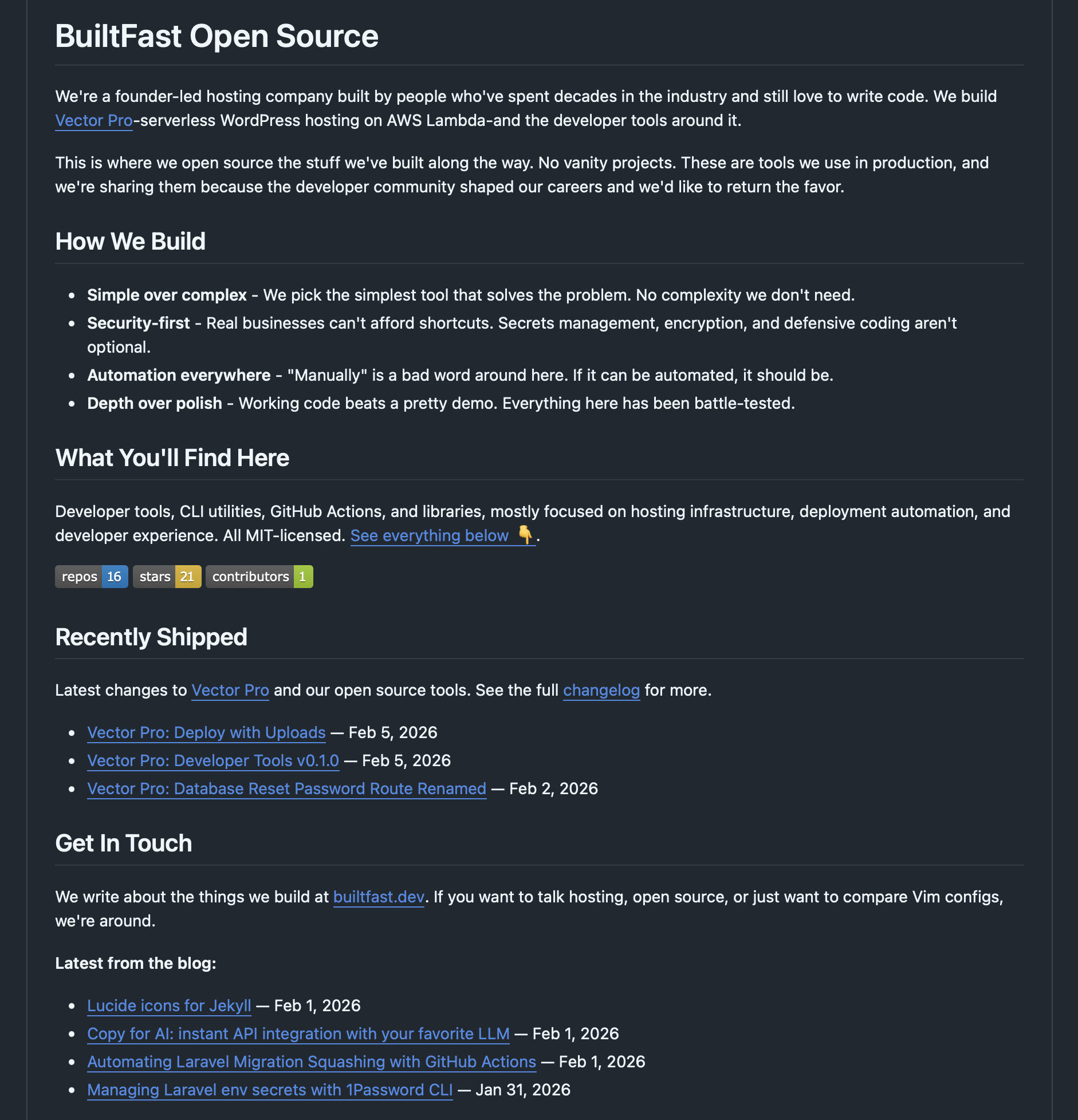
GitHub lets organizations display a profile README on their main page via a special .github repository. It’s a great place to introduce your team and showcase your work. The problem is that a static README goes stale fast — your latest blog posts aren’t listed, your project stats are wrong, and your changelog is three months behind.
We automated ours. Every 6 hours, a GitHub Actions workflow pulls in our latest blog posts, changelog entries, and org-wide stats, then commits the updated README. Zero manual effort.
Here’s how it works.
The Setup
GitHub displays a profile README for any organization that has a .github repository with a profile/README.md file. Our .github repository has a simple structure:
.github/
├── .github/
│   ├── workflows/
│   │   └── update-readme.yml
│   └── scripts/
│       └── update_readme.rb
└── profile/
    └── README.md
The README contains static content — our philosophy, what we build, how to get in touch — plus three dynamic sections wrapped in HTML comment markers:
<!-- START:badges -->
...dynamic badge content...
<!-- END:badges -->

<!-- START:recently_shipped -->
...dynamic changelog entries...
<!-- END:recently_shipped -->

<!-- START:blog_post -->
...dynamic blog posts...
<!-- END:blog_post -->
These markers are the key to the whole system. The Ruby script finds them and replaces everything between them with fresh content.
The Workflow
The GitHub Actions workflow is deliberately minimal:
name: Update Profile README

on:
  schedule:
    - cron: '0 */6 * * *'
  workflow_dispatch:

permissions:
  contents: write

jobs:
  update-readme:
    runs-on: ubuntu-latest
    steps:
      - uses: actions/checkout@v4
      - uses: ruby/setup-ruby@v1
        with:
          ruby-version: '3.3'
      - run: ruby .github/scripts/update_readme.rb
        env:
          GH_TOKEN: ${{ secrets.GITHUB_TOKEN }}
      - name: Commit and push if changed
        run: |
          git diff --quiet profile/README.md && exit 0
          git config user.name "github-actions[bot]"
          git config user.email "github-actions[bot]@users.noreply.github.com"
          git add profile/README.md
          git commit -m "Update profile README dynamic sections"
          git push
A few things worth noting:
- Scheduled + manual trigger: The cron runs every 6 hours, but
workflow_dispatchlets us trigger it on demand after publishing a post or shipping a release. - Conditional commit:
git diff --quietexits early if nothing changed, so we don’t create empty commits. - No external dependencies: The Ruby script uses only stdlib modules, so there’s no
bundle installstep. - Built-in token:
GITHUB_TOKENis all we need — no PATs to manage or rotate.
The Ruby Script
The update script handles three data sources: our blog feed, our changelog feed, and the GitHub API.
Fetching Blog Posts and Changelog Entries
Both our blog and changelog publish Atom feeds. The script fetches and parses them with Ruby’s built-in REXML:
def fetch_atom_feed(url)
  body = fetch_url(url)
  return nil unless body

  REXML::Document.new(body)
rescue StandardError => e
  warn "Failed to parse feed from #{url}: #{e.message}"
  nil
end

def latest_blog_posts(doc, count = 4)
  return [] unless doc

  posts = []
  REXML::XPath.each(doc, "//entry") do |entry|
    break if posts.length >= count

    title = entry.elements["title"]&.text
    link = entry.elements["link"]&.attributes&.[]("href")
    published = entry.elements["published"]&.text || entry.elements["updated"]&.text
    next unless title && link

    date = Time.parse(published).strftime("%b %-d, %Y") if published
    posts << {title: title, url: link, date: date}
  end

  posts
end
No gems required. REXML and net/http handle everything. If a feed is unreachable, the script logs a warning and skips that section rather than failing the entire run.
Fetching GitHub Organization Stats
The script queries the GitHub API for org-wide statistics — total public repos, combined stargazer count, and number of public members:
def fetch_github_stats(org)
  token = ENV["GH_TOKEN"]
  headers = {"Accept" => "application/vnd.github+json", "User-Agent" => "bf-readme-updater"}
  headers["Authorization"] = "Bearer #{token}" if token

  repos = []
  page = 1

  loop do
    uri = URI("https://api.github.com/orgs/#{org}/repos?type=public&per_page=100&page=#{page}")
    req = Net::HTTP::Get.new(uri, headers)
    res = Net::HTTP.start(uri.hostname, uri.port, use_ssl: true) { |http| http.request(req) }
    break unless res.is_a?(Net::HTTPSuccess)

    batch = JSON.parse(res.body)
    break if batch.empty?

    repos.concat(batch)
    page += 1
  end

  stars = repos.sum { |r| r["stargazers_count"] || 0 }

  # ... fetch public members count ...

  {repos: repos.length, stars: stars, contributors: contributors}
end
The results are rendered as shields.io badges that display inline in the README.
Updating the README
The final step uses regex to find each marker pair and replace the content between them:
def update_readme(path, sections)
  content = File.read(path)

  sections.each do |name, body|
    next unless body

    marker_re = /<!-- START:#{Regexp.escape(name)} -->\n(?:.*\n)*?<!-- END:#{Regexp.escape(name)} -->/
    replacement = "<!-- START:#{name} -->\n#{body}\n<!-- END:#{name} -->"

    if content.match?(marker_re)
      content.gsub!(marker_re, replacement)
    else
      warn "Marker <!-- START:#{name} --> not found in README, skipping"
    end
  end

  File.write(path, content)
end
Regexp.escape on the marker names prevents injection issues if a section name ever contained special regex characters. The script also warns if a marker isn’t found rather than silently failing.
The Result
Every 6 hours, our GitHub profile updates itself with:
- Organization stats — repo count, total stars, and contributor count as live badges
- Recently shipped — the 3 latest changelog entries with links and dates
- Latest from the blog — the 4 most recent blog posts
When we publish a new post or ship a release, the profile reflects it within hours — or immediately if we trigger the workflow manually.
Why This Approach
We considered a few alternatives before landing here:
- GitHub Profile README generators — most are overly complex for what we needed, and we didn’t want to depend on third-party services.
- JavaScript/Node — would have required installing dependencies. Ruby’s stdlib handles HTTP, XML, and JSON natively.
- Updating on push — we’d need webhooks or cross-repo triggers from the blog. A scheduled cron is simpler and covers all content sources with one workflow.
The whole thing is a single Ruby script with zero dependencies, a 30-line workflow file, and comment markers in a README. It’s easy to extend — adding a new dynamic section is just a new marker pair and a few lines of Ruby.
The full source is available at built-fast/.github.